

venfiw
-
Posts
38 -
Joined
-
Last visited
Posts posted by venfiw
-
-
manager.setCookies(cookies, (err) => { // console.log(manager) console.log("### 准备连接报价API") if(err){ console.log("## 连接报价API失败") console.log("## ERRmessage:" + err); } else { console.log("## 连接报价API成功"); manager.getInventoryContents(730, 2, true, function (err, inventory){ console.log("tradeable",inventory.length); tradeablecount = inventory.length; }); manager.getInventoryContents(730, 16, false, function (err, inventory){ console.log("protect",inventory.length); protectcount = inventory.length; }); if (inventorycount!="") { getMarketListings(cookies); } } });function getMarketListings(cookies) { console.log("### 开始查询Steam市场上架数量"); // 构建cookie字符串 let cookieString = ''; if (Array.isArray(cookies)) { cookieString = cookies.join('; '); } else { cookieString = cookies; } // 第一步:先访问资格检查页面 let eligibilityOptions = { url: 'https://steamcommunity.com/market/eligibilitycheck/?goto=%2Fmarket%2F', headers: { 'Cookie': cookieString, 'User-Agent': 'Mozilla/5.0 (Windows NT 10.0; Win64; x64) AppleWebKit/537.36 (KHTML, like Gecko) Chrome/139.0.0.0 Safari/537.36', 'Accept': 'text/html,application/xhtml+xml,application/xml;q=0.9,image/avif,image/webp,image/apng,*/*;q=0.8,application/signed-exchange;v=b3;q=0.7', 'Accept-Language': 'zh-CN,zh;q=0.9,is;q=0.8', 'Accept-Encoding': 'gzip, deflate, br, zstd', 'Connection': 'keep-alive', 'Pragma': 'no-cache', 'Cache-Control': 'no-cache', 'DNT': '1', 'Upgrade-Insecure-Requests': '1', 'Sec-Fetch-Site': 'none', 'Sec-Fetch-Mode': 'navigate', 'Sec-Fetch-User': '?1', 'Sec-Fetch-Dest': 'document', 'sec-ch-ua': '"Not;A=Brand";v="99", "Google Chrome";v="139", "Chromium";v="139"', 'sec-ch-ua-mobile': '?0', 'sec-ch-ua-platform': '"Windows"' }, followRedirect: false, // 不自动跟随重定向 timeout: 30000, gzip: true }; // 如果使用代理,添加代理配置 if (apiproxy === "1") { if (proxyset && proxyset.indexOf("http") >= 0) { eligibilityOptions.proxy = proxyset; } else if (proxyset && proxyset.indexOf("sock") >= 0) { eligibilityOptions.socksProxy = proxyset; } else if (proxyipuse) { eligibilityOptions.proxy = "http://" + proxyipuse; } } request(eligibilityOptions, function(error, response, body) { if (error) { console.log("## 资格检查失败: " + error); return; } // 获取新的cookies let newCookies = cookieString; if (response.headers['set-cookie']) { const additionalCookies = response.headers['set-cookie'].map(cookie => { return cookie.split(';')[0]; }).join('; '); newCookies += '; ' + additionalCookies; } console.log("## 资格检查完成,准备访问市场页面"); // 第二步:访问市场页面 let marketOptions = { url: 'https://steamcommunity.com/market/', headers: { 'Cookie': newCookies, 'User-Agent': 'Mozilla/5.0 (Windows NT 10.0; Win64; x64) AppleWebKit/537.36 (KHTML, like Gecko) Chrome/139.0.0.0 Safari/537.36', 'Accept': 'text/html,application/xhtml+xml,application/xml;q=0.9,image/avif,image/webp,image/apng,*/*;q=0.8,application/signed-exchange;v=b3;q=0.7', 'Accept-Language': 'zh-CN,zh;q=0.9,is;q=0.8', 'Accept-Encoding': 'gzip, deflate, br, zstd', 'Connection': 'keep-alive', 'Pragma': 'no-cache', 'Cache-Control': 'no-cache', 'DNT': '1', 'Upgrade-Insecure-Requests': '1', 'Sec-Fetch-Site': 'none', 'Sec-Fetch-Mode': 'navigate', 'Sec-Fetch-User': '?1', 'Sec-Fetch-Dest': 'document', 'sec-ch-ua': '"Not;A=Brand";v="99", "Google Chrome";v="139", "Chromium";v="139"', 'sec-ch-ua-mobile': '?0', 'sec-ch-ua-platform': '"Windows"' }, followRedirect: true, maxRedirects: 3, timeout: 30000, gzip: true }; // 添加代理配置 if (apiproxy === "1") { if (proxyset && proxyset.indexOf("http") >= 0) { marketOptions.proxy = proxyset; } else if (proxyset && proxyset.indexOf("sock") >= 0) { marketOptions.socksProxy = proxyset; } else if (proxyipuse) { marketOptions.proxy = "http://" + proxyipuse; } } if (inventorycount!="") { request(marketOptions, function(marketError, marketResponse, marketBody) { if (marketError) { console.log("## 查询市场上架数量失败"); console.log("## ERRmessage:" + marketError); return; } if (marketResponse.statusCode !== 200) { console.log("## 查询市场上架数量失败,状态码:" + marketResponse.statusCode); return; } try { // 使用cheerio解析HTML const $ = cheerio.load(marketBody); const marketListingsElement = $('#my_market_selllistings_number'); if (marketListingsElement.length > 0) { const listingscount = marketListingsElement.text().trim(); console.log("market: " + listingscount); marketcount = listingscount; const inventorycounttotal = "["+tradeablecount+","+protectcount+","+marketcount+"]"; if (inventorycount!=0) { request(Config.inventorycount.replace("{steamid64}",client.steamID).replace("{inventorycount}",inventorycounttotal), (err, res, body) => { if (err) {console.log("@debug inventorycount")}else{console.log("\n### 成功上传API inventorycount")} }) } } else { console.log("## 未找到市场上架数量元素 (my_market_selllistings_number)"); } } catch (parseError) { console.log("## 解析市场页面失败"); console.log("## ERRmessage:" + parseError); } }); } }); }i use this code can get protect tradeable marketlisting itemcount
but now steam update a patch, item which marketlisting still use one shot on inventory, and it will belong protectcount, is there any way to get is clear?

-
i am trying to use apikey to check friends list, when people send me check on steam messagebox
but i today i find my checklink and find apikey is null
but it works before
i find the answer at here :That's the point. Enabling useAccessToken disable fetching an API key.
-
same with me
-
it fixed i use lastest version sir
thanks
-
{"success":true,"conf":[{"type":3,"type_name":"市场上架","id":"13799522352","creator_id":"4312807682411105534","nonce":"6051457786246300023","creation_time":1687312714,"cancel":"取消","accept":"创建上架物品","icon":"https:\/\/community.steamstatic.com\/economy\/image\/-9a81dlWLwJ2UUGcVs_nsVtzdOEdtWwKGZZLQHTxDZ7I56KU0Zwwo4NUX4oFJZEHLbXH5ApeO4YmlhxYQknCRvCo04DEVlxkKgpopamie19f0Ob3Yi5FvISJl4iZmPr1J7LSqWZU7Mxkh9bN9J7yjRrl-0NuZWD6IdKUIVM8Y17V_wLsw7_m05C0tMzOynVrs3QnsyuJlxzjn1gSObdx-fQC\/128fx128f","multi":true,"headline":"以 ¥ 17.49 出售","summary":["SSG 08 | 抖枪"],"warn":null},{"type":2,"type_name":"交易报价","id":"13799381939","creator_id":"6149461971","nonce":"1534880661087315454","creation_time":1687310383,"cancel":"取消","accept":"接受","icon":"https:\/\/avatars.st.dl.eccdnx.com\/d619c74af3aa2c5912fd39c11d4e4a83c0ac2c60_full.jpg","multi":false,"headline":"Venfiw 国区85折","summary":["您需要放弃 无政府主义者","您不会收到任何物品"],"warn":null}]}we can confirm obj before with creator_id,
but now we can't, it just show : Could not find confirmation for object 4312807682411105534
what should i do
-
is there anyway to get steamcommunity market histroy?
-
i just want get cards
don't want to use asf
-
### 等待脚本完成自检 ### 报价连接尚未完成 ### 等待连接Steam社区:7秒 [T3#12] Handled message: Community.GetAppRichPresenceLocalization#1_Response Sending message: Community.GetAppRichPresenceLocalization#1 [T3] Got incomplete message; expecting 4368 more bytes [T3#13] Handled message: Community.GetAppRichPresenceLocalization#1_Response Sending message: Community.GetAppRichPresenceLocalization#1 [T3#14] Handled message: Community.GetAppRichPresenceLocalization#1_Response Sending message: Community.GetAppRichPresenceLocalization#1 ### 等待脚本完成自检 ### 报价连接尚未完成 ### 等待连接Steam社区:8秒 [T3#15] Handled message: Community.GetAppRichPresenceLocalization#1_Response Sending message: Community.GetAppRichPresenceLocalization#1 [T3#16] Handled message: Community.GetAppRichPresenceLocalization#1_Response Sending message: Community.GetAppRichPresenceLocalization#1 [T3#17] Handled message: Community.GetAppRichPresenceLocalization#1_Response Sending message: Community.GetAppRichPresenceLocalization#1 Sending message: ClientRequestWebAPIAuthenticateUserNonce ### 等待脚本完成自检 ### 报价连接尚未完成 ### 等待连接Steam社区:9秒 [T3#18] Handled message: Community.GetAppRichPresenceLocalization#1_Response Sending message: Community.GetAppRichPresenceLocalization#1 [T3#19] Handled message: ClientPersonaState [T3#20] Handled message: ClientRequestWebAPIAuthenticateUserNonceResponse Webauth failed: unable to verify the first certificate [T3#21] Handled message: ClientPersonaState [T3#22] Handled message: Community.GetAppRichPresenceLocalization#1_Responseand here is debug
now i add this code and it can work
process.env['NODE_TLS_REJECT_UNAUTHORIZED'] = 0
-
hello Dr. McKay
my country can't visit steamcommunity.com
so we use nginx Reverse Proxy to fix it
and it work
server { listen 443 ssl; server_name steamcommunity.com; ssl_certificate C:/nginx-1.15.5/cert/cert.crt; ssl_certificate_key C:/nginx-1.15.5/cert/cert.key; ssl_session_cache shared:SSL:1m; ssl_session_timeout 5m; ssl_ciphers HIGH:!aNULL:!MD5; ssl_prefer_server_ciphers on; location / { proxy_pass https://23.2.16.11; proxy_set_header Host steamcommunity.com; proxy_set_header X-Real-IP $remote_addr; proxy_set_header X-Forwarded-For $proxy_add_x_forwarded_for; proxy_set_header REMOTE-HOST $remote_addr; } }var community = new SteamCommunity({ "request": request.defaults({"rejectUnauthorized": false}), }); var manager = new TradeOfferManager({ steam: client, community: community, language:'en' });and yesterday my country can't visit steampowered.com at some time and in that time my script can't login steamcommunity accept offer
so i use same way for api.steampowered.com
server { listen 443 ssl; server_name store.steampowered.com; ssl_certificate C:/nginx-1.15.5/cert/cert.crt; ssl_certificate_key C:/nginx-1.15.5/cert/cert.key; ssl_session_cache shared:SSL:1m; ssl_session_timeout 5m; ssl_ciphers HIGH:!aNULL:!MD5; ssl_prefer_server_ciphers on; location / { proxy_pass https://23.2.16.11; proxy_set_header Host store.steampowered.com; proxy_set_header X-Real-IP $remote_addr; proxy_set_header X-Forwarded-For $proxy_add_x_forwarded_for; proxy_set_header REMOTE-HOST $remote_addr; } } server { listen 443 ssl; server_name api.steampowered.com; ssl_certificate C:/nginx-1.15.5/cert/cert.crt; ssl_certificate_key C:/nginx-1.15.5/cert/cert.key; ssl_session_cache shared:SSL:1m; ssl_session_timeout 5m; ssl_ciphers HIGH:!aNULL:!MD5; ssl_prefer_server_ciphers on; location / { proxy_pass https://23.2.16.11; proxy_set_header Host api.steampowered.com; proxy_set_header X-Real-IP $remote_addr; proxy_set_header X-Forwarded-For $proxy_add_x_forwarded_for; proxy_set_header REMOTE-HOST $remote_addr; } }var client = new SteamUser({ "request": request.defaults({"rejectUnauthorized": false}) });and my chrome can open it but it not works for script
the script always can't login steamcommunity.com by use steamusercookies
I guess it may be that the certificate is not set for the script
Is there a place where i can set up , so i can visit api.steampowered.com or u have some suggest
Best regards
i try to find node_modules\steamcommunity\index.js
223 lines
// this.httpRequestPost({ // "uri": "https://api.steampowered.com/IMobileAuthService/GetWGToken/v1/", // "form": { // "access_token": token // }, // "json": true // } //change to this.httpRequestPost({ "uri": "https://api.steampowered.com/IMobileAuthService/GetWGToken/v1/", "form": { "access_token": token }, "json": true, "rejectUnauthorized": false }but it now works
-
I found that since two years ago, steamcommunity.com will be too lag every night
so i use nginx to Reverse Proxy
is there any way to use nodejs do that?
-
var itemlist = require('./itemlist/itemlist.json'); client.on('friendMessage#'+Config.admin, function(steamID, message) { if (message.toUpperCase().indexOf("@changejson") >= 0) { delete require.cache[require.resolve("./itemlist/itemlist.json")] itemlist = require('./itemlist/itemlist.json').data; } });here is code when bot get your message, it will reset itemlist to new
-
when i login steam
i can use this get cookie
client.on('webSession', function(sessionid, cookies) { stsessionid = sessionid; stcookies = cookies; console.log("sessionid:",sessionid,"\ncookies:",cookies); });but just show sessionid, steamLogin, steamLoginSecure
is there any i can get shoppingCartGID?
or what should i do if i want buy game for otherspeople
-
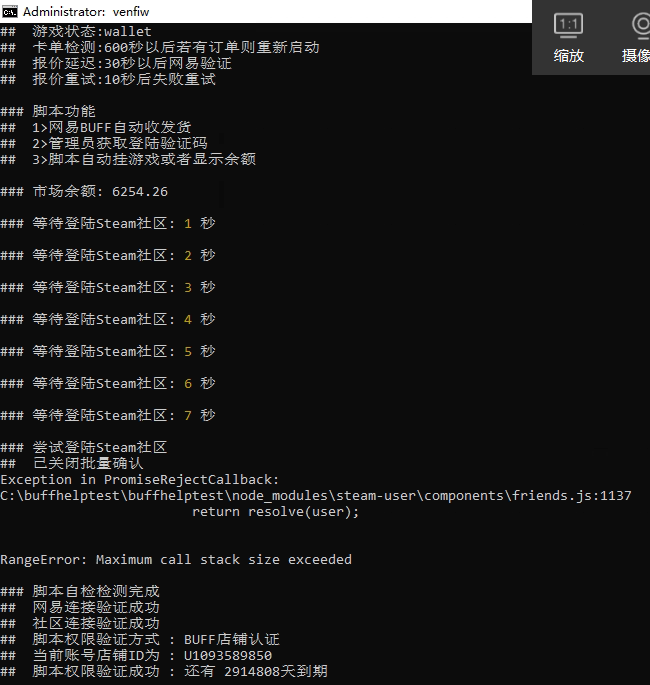
Exception in PromiseRejectCallback: C:\buffhelptest\buffhelptest\node_modules\steam-user\components\friends.js:1137 return resolve(user); RangeError: Maximum call stack size exceededtoday i update the steam-user to 4.19.10 and it show this err, Although it seems not very important for me
when i use old version it wouldn't happen ["steam-user": "^3.15.0"]
and here is some code, this errmessage always show after use websession
client.on('webSession', function(sessionid, cookies) { if (Config.autoconfirm!=="") { var confirmtime=Config.autoconfirm*1000; community.startConfirmationChecker(confirmtime,identity); console.log("\n### 尝试登陆Steam社区\n## 已开启批量确认:",Config.autoconfirm,"秒确认一次,注意不要手动去Steam接受非buff来源的报价,不然你会失去饰品"); }else { console.log("\n### 尝试登陆Steam社区\n## 已关闭批量确认"); } manager.setCookies(cookies); community.setCookies(cookies); h20vf = "done"; });and i login another steamaccount, it wouldn't happen
maybe my main account friend is too many? my main account have 1900 friends
-
and i make a request , sometime it will visited other site get untrade offer, if find it then restart the bot
-
community.acceptConfirmationForObject(identity, creator.id, function(err){ });i find it at here, if confirm trade we use tradeid, if confirm market ,we use creatorid
-
i will sell some skins on steammarket
is there any except use community.startConfirmationChecker(confirmtime,identity)
-
csgotrade is so many on china
so i know it , sometimes steamcommunity will very busy
value will cancel some trade
-
some times con't get offer,
SteamUser can login, but client.on('webSession') can't login community
client.on('webSession', function(sessionid, cookies) {
manager.setCookies(cookies);
community.setCookies(cookies);
});i see the nginx logs it shows will 301 to https://steamloopback.host/index.html
may be toomany request in times?
-
is there any way when some one chat to me i can know How many days have we been friends
-
client.on('friendMessage', function(steamID, message){ var msg_him=Object.keys(Config.reply); var msg_my=Object.values(Config.reply); var replycount=msg_my.length; for (var i = replycount - 1; i >= 0; i--) { if (message==msg_him[i]) { //if (message.indexOf(msg_him[i]) >= 0) client.chatMessage(steamID,msg_my[i]); } } })
Config.js
"reply":{ "谁是大帅比":"当然是venfiw", "代购":"当前代购折扣为:8折,需要7天以上Steam好友,请用QQ联系我, 554515860", "hello":"hi" }
when some send hello in chat, ur bot will send hi
or u can use : if (message.indexOf(msg_him) >= 0)
when some send hello*** in chat, ur bot will send hi
-
is this function living?
community.declineConfirmationForObject(Config.identity, message.replace("@confirm ",""), function(err){ if(err){ console.log(' Cant confirmed the offer. Please try again later'); client.chatMessage(Config.admin, "HI admin: Cant confirmed the offer"); } else { console.log(' Succesfully confirmed the offer.'); client.chatMessage(Config.admin, "HI admin: Offer was successful"); } }); -
now,i use this ways, first accept all offer, then i send a message to my bot ,to confirm i want offer
if (message.indexOf("@confirm") >=0) { if (steamID == Config.admin) { community.acceptConfirmationForObject(Config.identity, message.replace("@confirm ",""), function(err){ if(err){ console.log(' Cant confirmed the offer. Please try again later'); client.chatMessage(Config.admin, "HI admin: Cant confirmed the offer"); } else { console.log(' Succesfully confirmed the offer.'); client.chatMessage(Config.admin, "HI admin: Offer was successful"); } }); } }now how can i send a message to make my bot accept offer or decline offer?
may be i can accept all offer and then i send confirm message to finish i want trade
and every 2hours decline all offer to decline i needn't offer
please help
-
You need your identity_secret to accept trade offers. There is no way around it.
https://dev.doctormckay.com/topic/365-cookies/#user-cookieexpiration
so can i use those cookies accept offer as gift replace identity_secret ?
- sessionid
steamLogin- steamLoginSecure*
- steamMachineAuth<SteamID>*
-
let client = new SteamUser(); community = new SteamCommunity({ "request": Request.defaults({"rejectUnauthorized": false}) }); manager = new TradeOfferManager({ steam: client, community: community, language:'en' }); if (config.autologin == 1) { client.logOn({ "accountName":config.username, "password":config.password, "twoFactorCode": SteamTotp.generateAuthCode(config.sharedse) }) } else { var rl = Readline.createInterface({ input: process.stdin, output: process.stdout }); rl.question("username: ", function(name) { var username = name; rl.question("password: ", function(pass) { var password = pass; client.logOn({ "accountName":config.username, "password":config.password, "twoFactorCode": SteamTotp.generateAuthCode(config.sharedse) }) }); }); } client.setOption('promptSteamGuardCode',true);//true代表手动输入令牌,false代表使用2FA文件 client.on('loggedOn',() => { console.log('\n### Logged into Steam\n## steamid64:'+client.steamID+'\n## play game:'+config.playgame+'\n## trademode:'+config.trade+'\n## invitmode:'+config.invite); client.setPersona(SteamUser.Steam.EPersonaState.Online); client.gamesPlayed(config.playgame); botid64 = client.steamID; botid3 = client.steamID.getSteam3RenderedID() }); client.on('webSession', function(sessionid, cookies) { manager.setCookies(cookies); community.setCookies(cookies); });is there any possible i can accept the tradeoffer with out 2FA sharedse?
in some reason, i lose my sharedse, i gave it for a tradesite, and it can help me to send skins to other peole, and i can get the code when i want to login.
and i make this bot can accept the offer when he got a tradeoffer,it works Just after logging in, but After a while 30mins or 1hours he can't accept the offer any more, and it just show "Unable to accept offer: Not Logged In"
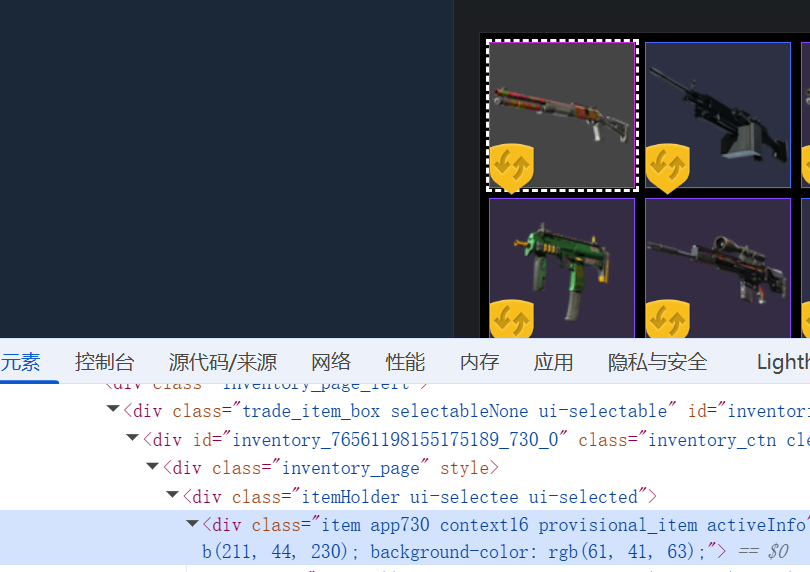
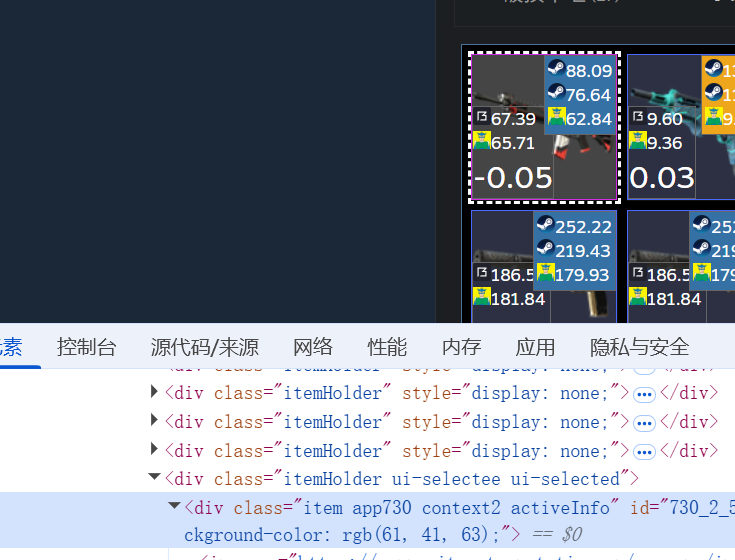
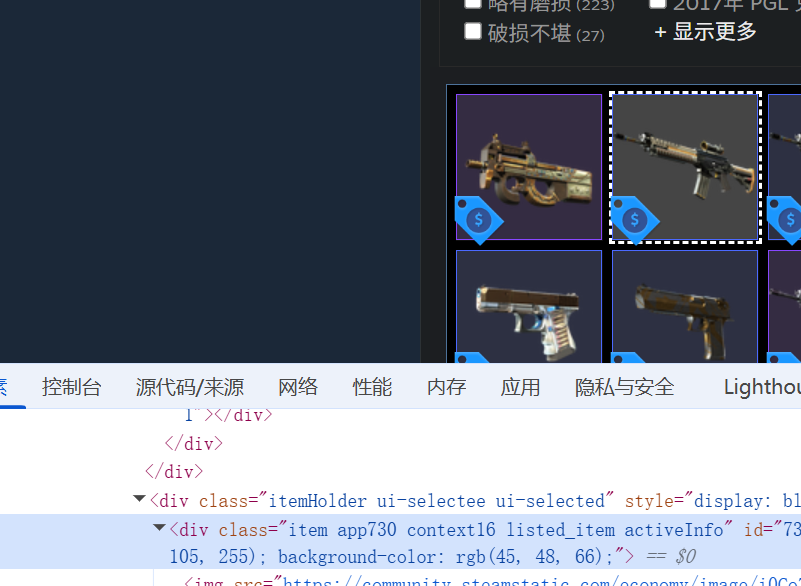
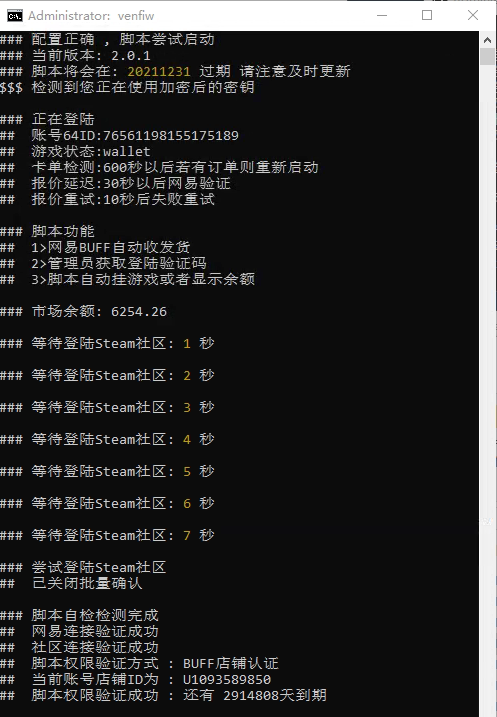
is there any to use manager.getInventoryContents() get itemcount on market?
in node-steam-tradeoffer-manager
Posted · Edited by venfiw
manager.getInventoryContents(730, 2, true, function (err, inventory){
  console.log("tradeable",inventory.length);
  tradeablecount = inventory.length;
});
manager.getInventoryContents(730, 16, false, function (err, inventory){
  console.log("protect",inventory.length);
  protectcount = inventory.length;
  if (inventorycount!="") {
    getMarketListings(cookies);
  }
});

******
if (marketListingsElement.length > 0) {
  const listingscount = marketListingsElement.text().trim();
  console.log("market: " + listingscount);
  const parsedMarketCount = parseInt(String(listingscount).replace(/,/g, ''), 10);
  marketcount = Number.isNaN(parsedMarketCount) ? 0 : parsedMarketCount;
  const adjustedProtectCount = Math.max(0, protectcount - marketcount);
  const inventorycounttotal = "["+tradeablecount+","+adjustedProtectCount+","+marketcount+"]";

  if (inventorycount!=0) {
    request(Config.inventorycount.replace("{steamid64}",client.steamID).replace("{inventorycount}",inventorycounttotal), (err, res, body) => { if (err) {console.log("@debug inventorycount")}else{console.log("\n### 成功上传API inventorycount")}
    })
  }
} else {
  console.log("##  未找到市场上架数量元素 (my_market_selllistings_number)");

}
now i use this code. but i want to know is there any way to get marketlisting like use manager.getInventoryContents
because they on inventory now