All Activity
- Past hour
-

new_assetid from getExchangeDetails is undefined
rsnrdk replied to G35's topic in node-steam-tradeoffer-manager
Thank you very much!😉 -
 rsnrdk reacted to a post in a topic:
new_assetid from getExchangeDetails is undefined
rsnrdk reacted to a post in a topic:
new_assetid from getExchangeDetails is undefined
- Today
-
-min(1).thumb.jpeg.467791fa472581b68464b62bab782c03.jpeg)
new_assetid from getExchangeDetails is undefined
TheMaster replied to G35's topic in node-steam-tradeoffer-manager
yes after the trade the new asset id is visible so just set up a inventory poll and u should be good any steam trading bot does inventory poll but be careful not to set the poll too frequent u can get ratelimited very fast. the old asset id is still in the event handler response so u have both the new id and the old one how i do it is i store a template of the doc in db then use a backfill script to fill in the new asset id. Hope that helps Regards - Last week
-
new_assetid from getExchangeDetails is undefined
rsnrdk replied to G35's topic in node-steam-tradeoffer-manager
Thank you for the answer! You mean I should compare my Bot`s inventory before and after the trade and then exctract the new items by asset_ids that i didn`t have before trade right? -
new_assetid from getExchangeDetails is undefined
TheMaster replied to G35's topic in node-steam-tradeoffer-manager
use the get inventory contents for hte new assetid - Earlier
-
 rsnrdk reacted to a post in a topic:
new_assetid from getExchangeDetails is undefined
rsnrdk reacted to a post in a topic:
new_assetid from getExchangeDetails is undefined
-
rsnrdk reacted to a post in a topic:
new_assetid from getExchangeDetails is undefined
-
new_assetid from getExchangeDetails is undefined
rsnrdk replied to G35's topic in node-steam-tradeoffer-manager
Hi everyone! Any updates on this topic? Currently the issue is still not fixed, maybe someone figured out another way to reliably determine who sent which item without new asset_id? I tried to check by Item Certificate but it also changes after trade between users. -
rsnrdk joined the community
-
I also used those headers and now works perfectly. I'm using a VPS without proxy and before it always failed (429) at https://steamcommunity.com/inventory/<s teamId>/440/2.
-
 Faaa97 joined the community
 -
vindisel reacted to a post in a topic:
Do I Need Proxies for Fetching Steam Inventories at Scale?
-
1. Yes, and they are quite low 2. Basically after only a few dozen requests per day 3. Rotating (but sticky) proxies 4. Residentials are better 5. Decodo works fine, but make sure you get IPV4 and not IPV6 6. No
- 1 reply
-
- 1
-
-
 asdfghjkl reacted to a post in a topic:
Identifying Steam Items
asdfghjkl reacted to a post in a topic:
Identifying Steam Items
-
Hi everyone, I'm currently building a system that needs to fetch users' Steam inventories programmatically. The main goal is to retrieve Steam inventory data reliably for a website/application, potentially for many different Steam accounts and with a relatively high number of requests. I'm trying to understand whether using proxies is necessary for this kind of setup. A few questions: Does Steam impose strict rate limits or IP-based restrictions when fetching public inventories? At approximately what request volume would proxies become necessary? Would rotating proxies be recommended, or would a small pool of static proxies be sufficient? Are datacenter proxies usually enough for Steam inventory requests, or are residential/ISP proxies required? What would be the most cost-effective proxy provider for this use case? Is there a better architecture for handling Steam inventory requests without relying heavily on proxies? My priority is reliability and keeping the operating cost as low as reasonably possible. I'd appreciate any advice from people who have experience dealing with Steam inventory endpoints at scale. Thanks!
-
greckaborik reacted to a post in a topic:
New request limits? (429 error)
-
 Bertman joined the community
 -
Hello, I've been trying to get this to work without any luck, and I can't find much information about it, so I thought I'd ask here. I'm currently trying to retrieve live match data for a user on my friends list who is currently playing a CS2 casual match, using the following code: let user = new SteamUser(); let csgo = new GlobalOffensive(user); user.logOn({ refreshToken: 'x' }); user.on('loggedOn', () => { console.log('user logged on') user.setPersona(SteamUser.EPersonaState.Online); user.gamesPlayed(730); }) csgo.on('debug', (message) => { console.log(message); }) csgo.on('connectedToGC', () => { console.log('connected to GC') csgo.requestLiveGameForUser('76561199034391625'); }); csgo.on('matchList', (matches, data) => { console.log(data) }) The connectedToGC event is emitted successfully, and requestLiveGameForUser does send the following message: "Sending GC message MatchListRequestLiveGameForUser" but it never emits the matchList event in return. I've also tried requestRecentGames(), which works fine for my own logged-in user, but not for friends. That's not an issue for what I'm doing, though. Any help or advice would be greatly appreciated.
-
vindisel reacted to a post in a topic:
New request limits? (429 error)
-
Nickers reacted to a post in a topic:
node-steamcommunity v3.50.3
-
I only recently switched to this option and not a single error in few days. Previous iteration also worked well with confirmations, but had some issues with inventory loading. Did last community update fixed this issue? (github people say no)
-
Nickers reacted to a post in a topic:
New request limits? (429 error)
-
Nickers reacted to a post in a topic:
New request limits? (429 error)
-
hi, did u update SteamCommunity on a new version?
-
This fix has been working for 40 hours, there have been no problems with anything. Share who has what results
-
check out this thread: https://dev.doctormckay.com/topic/5946-new-request-limits-429-error/
-
it just brute forced it. I just used "/Goal" mode in codex. it changed a bit, sent a new request, changed a bit, sent a new request, on and on an on, in a loop. for like 30 minutes.
-
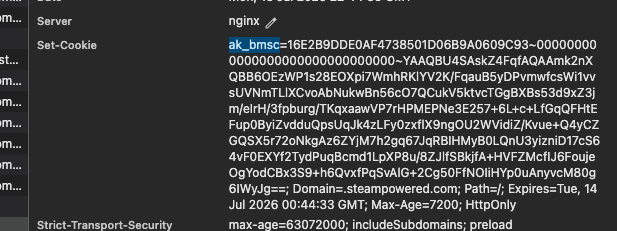
😵💫 I was panicking 😅 but thanks for the clarification. This cookie new for me. I've never seen it in cookies since yesterday.
-
steam using this cookies few years) dont panic
-
 AceCrew joined the community
 -
Something big comming 🤫 - steam has new cookies bm_sv and ak_bmsc

-
This still seems to work fine for me atm. But Steam seems to go through a bit of turbulence right now, so I catch stray 500's and 400's I'm afraid it's specific Steam-related problem from recent site changes and GPT won't have that in it's training data. Did it give any guesses on why this might work? Many years of being afraid for my normal trading accounts T ^ T
-
Send correct user-agent for mobileconf requests, to avoid 429 errors (#371) Full Changelog: v3.50.2...v3.50.3 View on GitHub
-
- 1
-
-
there is always risk of getting banned with steam
-
Hey guys. I have asked gpt5.5 to fix it. (With the samples from this thread) And telling it that it needs to change the headers to prevent akamai WAF. This was the set of headers that works for 95 percent of times: const headers = { 'Sec-Fetch-Dest': 'empty', 'Sec-Fetch-Mode': 'cors', 'Sec-Fetch-Site': 'same-origin', }; Although, some endpoints needed some more tuning. (E.g. getting partner details after creating an offer) So right now, i use this to change header dynamically: I have been using this for the past 36 hours and it is working fine. Is there anything suspicious about this? Is there a ban risk? (I don't think so myself, but wanted to share it)
-

new_assetid from getExchangeDetails is undefined
GeaRetar replied to G35's topic in node-steam-tradeoffer-manager
@Lukasz Any updates on this? -
GeaRetar joined the community
-
 Impressive joined the community
 -
This option also turned out to be quite working, for me it does not even require changing the Accept-Encoding, the key is to transfer Accept and sec-fetch-user. headers: { //"User-Agent": "Mozilla/5.0 (Linux; Android 14; Pixel 8) AppleWebKit/537.36 (KHTML, like Gecko) Chrome/140.0.0.0 Mobile Safari/537.36", "Accept": "text/html,application/xhtml+xml,application/xml;q=0.9,image/avif,image/webp,image/apng,*/*;q=0.8", //"Accept-Encoding": "gzip, deflate, br, zstd", "Accept-Language": "en-US,en;q=0.9", "sec-ch-ua": "\"Chromium\";v=\"140\", \"Not=A?Brand\";v=\"24\", \"Google Chrome\";v=\"140\"", "sec-ch-ua-mobile": "?1", "sec-ch-ua-platform": "\"Android\"", "sec-fetch-dest": "document", "sec-fetch-mode": "navigate", "sec-fetch-site": "same-origin", "sec-fetch-user": "?1", "upgrade-insecure-requests": "1" }
-
It's absolutely crazy, every time i delete one parameter, everything starts to work. What is the logic behind this? headers: { 'Accept-Encoding': 'zstd', // 🤪 },
-
thanks so much