Search the Community
Showing results for tags 'Question'.
-
i am trying to get the current xp of a user and the xp required to achieve a level but i don't know how to see how much xp they currently have? is there something built into steam-user or should i use another module? here is my code for the command function level(steamID, level){ client.getSteamLevels([steamID], function(results){ console.log("level: " + results[steamID] + "xp: " + results[steamID].xp); // just gives me undefined for the result for xp if(level === undefined){ level = results[steamID]; } if(level >= results[steamID]){ client.chatMessage(steamID, "You would need " + /*xp required here*/ + "more xp for level " + level); } else{ client.chatMessage(steamID, "Please enter a higher number"); } });}
-
I am trying to get the tf2 quantities, but how am I supposed to get it. I saw on the post that you need an item tag, but how do I get it?\ LINK: https://dev.doctormckay.com/topic/1863-how-do-i-identify-tf2-qualities/
-
How to fix it i try all webLogOn script but dont working ı use this commands; const async = require('async'); const TradeOfferManager = require('steam-tradeoffer-manager');var manager = null; const SteamCommunity = require('steamcommunity');var community = null;const WebAPI = require('@doctormckay/steam-webapi');var api = null;const SteamID = require('steamid'); const steam = require('./steam');const users = require('./users');const files = require('./files'); var first = true;var ongoing = false; exports.setup = (client, cookies, callback) => {manager = new TradeOfferManager({steam: client,domain: "example.net"});community = new SteamCommunity(); manager.setCookies(cookies);community.setCookies(cookies);api = new WebAPI(files.getConfig().apikey);if(first) {callback();first = false;}registerEvents(); community.on("sessionExpired",function(err) {client.webLogOn();});
-
Can you help me i dont know how to create this function with command !all take all partner cupons to offer. client.on("friendMessage", (partner, message) => { if(message === "!all"){ const offer = manager.createOffer(partner); manager.loadUserInventory(partner, 753, 3, true, (err, theirInv) => { if (err) { console.log(err); } else { const theirItem = theirInv[Math.floor(Math.random() * theirInv.length - 1)]; offer.addTheirItems(theirItem); offer.setMessage( `U cuppon` ); offer.send((err, status) => { if (err) { console.log(err); } else { console.log(`Sent offer. Status: ${status}.`); } }); } } ); } });
-
I have a site i am creating in nodejs based on my code in php and wandering how to call steam api json json like https://steamcommunity.com/profiles/76561198076819824/inventory/json/440/2/I know how to use Express js but i am unfamiliar with how to Call GET for JSON
-
 I want to confirm offer from server app but i am also using SteamDesktopAuth and while i am trying to confirm it there is a error: Error: It looks like your Steam Guard Mobile Authenticator is providing incorrect Steam Guard codes. This could be caused by an inaccurate clock or bad timezone settings on your device. If your time settings are correct, it could be that a different device has been set up to provide the Steam Guard codes for your account, which means the authenticator on this device is no longer valid. at /usr/home/MMMM/domains/XXX/public_trade2/node_modules/steamcommunity/components/confirmations.js:33:14 at SteamCommunity.<anonymous> (/usr/home/MMMM/domains/XXX/public_trade2/node_modules/steamcommunity/components/confirmations.js:276:3) at Request._callback (/usr/home/MMMM/domains/XXX/public_trade2/node_modules/steamcommunity/components/http.js:67:15) at Request.self.callback (/usr/home/MMMM/domains/XXX/public_trade2/node_modules/request/request.js:185:22) at emitTwo (events.js:126:13) at Request.emit (events.js:214:7) at Request.<anonymous> (/usr/home/MMMM/domains/XXX/public_trade2/node_modules/request/request.js:1161:10) at emitOne (events.js:116:13) at Request.emit (events.js:211:7) at Gunzip.<anonymous> (/usr/home/MMMM/domains/XXX/public_trade2/node_modules/request/request.js:1083:12)So it is possible to confirm it from server?
 -
I don't understand what to put in the username and password fields, My main steam account? I've got it logged it but i left the two fields and twoFactorCode Blank. Do I manually register a new steam account through steam? I'm trying to make a trading bot. I understand this is a stupid question, any help would be appreciated.
-
hello i need the inventory value from a Steamid64. How do i do that. Sry that iam asking but iam kinda new here thanks for ur help
-
Since the latest UI update I'm not able to get this event, does anyone know what changed? I can't even get a simple console.log out of it anymore.
-
Hello guys, My bot has !check [n] command which tells how much sets you get for a certain key. I want it as well to calculate the level the buyer would get if he bought that amount of sets. For example !check 5. For 5 keys you get let's say 50 sets. That is 5000 experience. I thought about adding that to current experience of buyer and then somehow calculating which level would that be. I will appreciate any ideas and suggestions. Thanks in advance.
-
Hey, I have a problem with changeEmail function. It worked for me untill 2 October 2018, but now when I am trying to use it, it says Access Denied. Can you check it and tell me what happened?
-
Hello. I have trouble with node-steam-totp module to work properly for me. The code I use: var SteamTotp = require('steam-totp'); var secret = 'secret_stuff'; setInterval(function () { console.log('Code #1 = ' + SteamTotp.generateAuthCode(secret)); SteamTotp.generateAuthCode(secret, function (error, code, offset, latency) { console.log('Code #2 = ' + code); }); }, 5000); I'm using secret_1 value from WinAuth. Codes are generated perfectly fine by WinAuth but both codes generated by code above are invalid. The secret I'm using is correct (I removed it from code snippet for security reasons). Do i miss something or is there something wrong with the module itself? Both node js code and WinAuth are running on the same machine and I'm using latest version of node-steam-totp. I'm happy to provide additional info if needed. Thanks in advance for any help.
-
I have a function which checks the input is in json data from url. How can i implement async await into it? I've got no success. All my attempts were returning pending promises. function checkUser(id){ var url = 'http://mywebsite.com'; var jsonObject; request(url, function (error, response, body) { if (!error && response.statusCode == 200) { jsonObject = JSON.parse(body); if (jsonObject.hasOwnProperty(id)) return jsonObject[id]; else return 0; } }); }
-
how can i get friends/mine games using node-steam-user?
-
I know the steam api doesnt have an api to send steam tradeoffers in php how can i send one by trade link? I want to have a site that u Select items to buy and it will send trade offers with those items and wandering how to do it from php with the trade offer link
-

Question Accepting friends request if member of group.
Seeringfate posted a topic in node-steam-user
Hi there, I'm trying to get my bot to accept friends request from members from my group. My code is not fully working, it keep getting errors at "community.groups(steamid). Here is my code: client.on("friendRelationship", (steamid, reletionship, name) => { if (reletionship === 2) { var userGroups = community.groups(steamid) if (userGroups.indexOf(wantedGroupID) != -1) { client.addFriend(steamid); client.chatMessage(steamid, `Thank you for adding me!`); console.log(`Friends request from ${name} accepted, IdleNet member. SteamID: ${steamid}`); } else { client.removeFriend(steamid); console.log(`Ignored friends request from ${name}, not in the IdleNet group. SteamID: ${steamid}`); } } });This is before my code: const SteamUser = require('steam-user'); const SteamTotp = require("steam-totp"); const SteamCommunity = require("steamcommunity"); const TradeOfferManager = require("steam-tradeoffer-manager"); var wantedGroupID = 'groupid'; const client = new SteamUser(); const community = new SteamCommunity(); const manager = new TradeOfferManager({ steam: client, community: community, language: "en" }); const logOnOptions = { accountName: 'name', password: 'pass', twoFactorCode: SteamTotp.generateAuthCode("secret") }; client.logOn(logOnOptions); client.on('loggedOn', () => { console.log('Logged into Steam'); client.setPersona(SteamUser.Steam.EPersonaState.Online) client.gamesPlayed("Testing"); }); client.on("webSession", (sessionid, cookies) => { manager.setCookies(cookies); community.setCookies(cookies); community.startConfirmationChecker(10000, "secret"); }); Could someone help me ? Thanks ! -
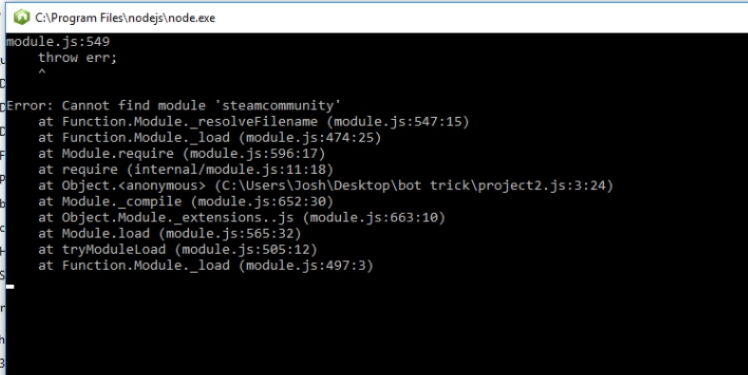
I'm attempting to get a bot working from the tutorial located at https://github.com/andrewda/node-steam-guide, but I seem to have run into a problem. I've been trying for several hours to get the bot to recognize the "steamcommunity" module on chapter 2.2, but nothing I've tried has worked. I've tried everything from redownloading the associated module to a full reinstall of everything related to the bot. Any help would greatly be appreciated. The error I get upon attempting to debug using my editor Copied directly from my editor, I narrowed the issue down to line 3 in a previous test, but haven't been able to figure it out. The first screenshot shows the admin console with the command I used to download the module as well as the node_modules and steamcommunity folders. The second screenshot shows the output of the node.js window.

-
newOffer event is not called sometimes... Even after restart of bot, event is still not fired. After I send second offer, newOffer triggers for both trades Not fired if i send 2 or more offers at the same time. Called only for one offer. Second offer calling newOfferafter sentOfferChanged or recievedOfferChanged triggers. Its seems like bug How could I fix this problem...I had lose many offers because this problem..
-
 I am not new to the steam bots but i am new to making it send steam offers and dont know how to do that with my bots
 -
 I'm trying to programmatically rename my weapons in CS:GO, mostly because I'm under the impression that inputs are only sanitized in the client. Now there's one sure-fire way to do this, and that's to disassemble the program itself, but not only is that pretty difficult to do, I run the risk of being VAC banned (even though I'm not trying to do anything the game doesn't intend me to do). So for me its a last resort option. The other way, the way I'm trying to do, is packet sniffing to find the request CS:GO sends. Here's the issue, I'm completely new to packet sniffing and I'm worried I won't be capturing the right data. I know I can save the data I collect, but I'm worried that after I use up the $2 to rename a weapon, I'd have collected the wrong packets. So before I start sniffing packets I need to be 100% sure I will collect the relevant packets, and that I'll be able to use them to find the request sent. I'm wondering if anyone could help me with this endeavor or at least point me in the right direction. TL;DR- How do I find the request CS:GO sends to rename a weapon.
 -

Question Chat commands /wait until the user sends a message/
tvman99 posted a topic in node-steam-user
I've been trying to make async/await work. If someone sends specific message they get specific pre-written reply. I've done that using friendMessage ID event. Down the road, I need to catch the user's reply to include it in the reply. Well i assume if i give you an example of it. Ofc the user should start it as long as bot does something depends on the chat message/ i call it chat command/. User: !addadmin Bot: Who's it? Send the steamid64 to me. User: xxxxxxxxxxxxxxxxx /*sends steamid64*/ Bot: xxxxxxxxxxxxxxxxx is not in my friends list. Tell him to add me. OR Bot: xxxxxxxxxxxxxxxxx is in my friends list. Made him/her the master of me. It was an example. If you are able to, code the catching of user reply and using it in some checks then replies. -
I am looking to make some sort of cpanel for bot. Is it possible to start/stop bot from web? I mean from nodejs or php. Also how can i pass username and password which is stored in db from web. Should i get username and password from db directly? what do you think. I would'nt prefer it logs in then logs out since node is still running the file on the server.
-
ClientGamesPlayed does not seem to work, I made sure the bot's privacy settings allowed for it client.gamesPlayed(440);
-
firstClient.on("friendMessage", function(steamID, message) { if (message == "!comment") { firstClient.chatMessage(steamID, "ok i comment you profile !") firstCommunity.postUserComment(steamID, "+REP")) nr2Community.postUserComment(steamID, "+rep ") } }); does anyone know how I can make both boots respond to the command when one of them gets the command?